Edit anywhere
Codex, your terminal, or the editor that keeps you in flow.
 RunnerKit
Stay in your editor, terminal, or coding agent. RunnerKit remembers how your Apple project runs, then lets Xcode do what it does best.
7-day full trialNo account or payment required
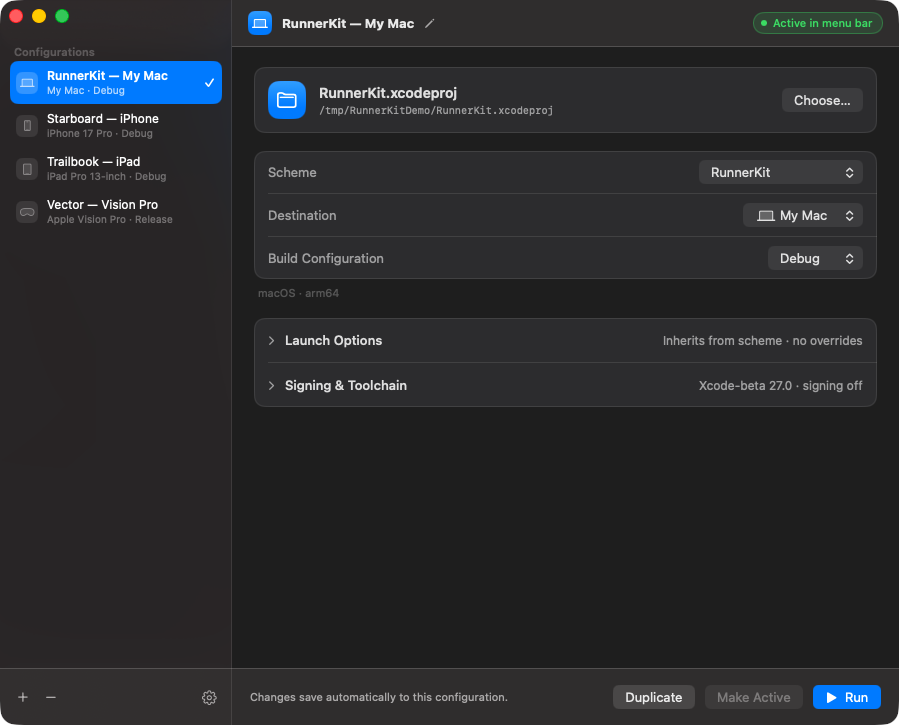
RunnerKit turns the choices scattered across Xcode into a small, reusable contract between your code and the device it belongs on.
Codex, your terminal, or the editor that keeps you in flow.
One saved configuration holds every Xcode decision.
Xcode builds. RunnerKit installs, launches, observes, and stops.
RunnerKit keeps one source of truth whether the next run starts from your menu bar or from an agent working through the CLI.
Left-click to run or stop. Right-click to switch the active target, configure it, inspect the last build log, jump into Xcode, or force a stuck operation to stop.
Start runs, wait for precise milestones, retrieve operation-scoped logs, and diagnose failures without guessing what the GUI is doing.
$ runnerkit run "RunnerKit — My Mac" \\
--until running --timeout 120
operation 8F12 accepted
✓ prepared 0.3s
✓ built 4.8s
✓ running pid 48211
$
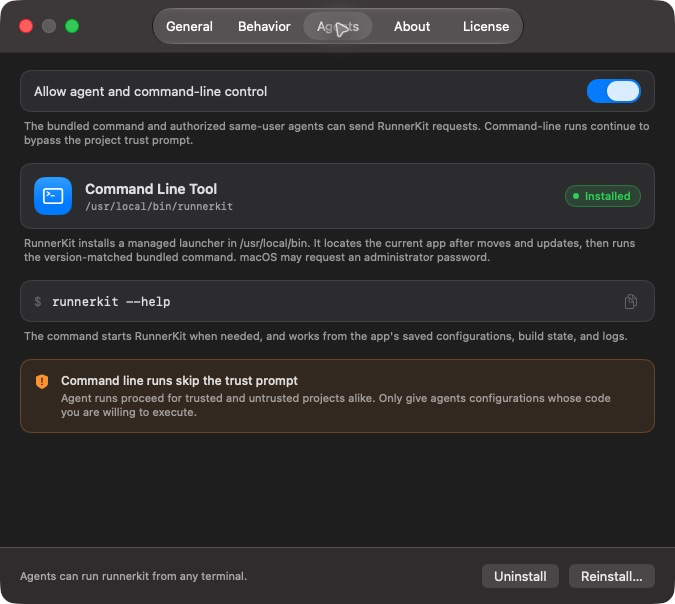
The menu-bar app remains the single owner of configurations, builds, launched applications, and logs. The bundled CLI simply gives your agent a precise, version-matched way to ask—and one switch can reject new command requests without stopping work already underway.
Save Xcode, project, scheme, destination, configuration, arguments, and environment as one named setup.
Launch macOS apps, simulators, and compatible physical devices through the toolchain already on your Mac.
Keep structured stage outcomes, durations, process identifiers, diagnostics, and retained logs for every operation.
RunnerKit selects each toolchain per run with DEVELOPER_DIR. Your global xcode-select setting stays exactly as it was.
Keep the menu-bar control, add an optional Dock presence, record global shortcuts, and decide when build progress appears.
Interactive runs ask before executing an unfamiliar project, keeping the code-execution boundary visible.
The essentials for developers and coding agents evaluating a repeatable Apple-platform run workflow.
RunnerKit is a native macOS menu-bar app that saves the Xcode choices required to build and run an Apple project. It gives developers, terminal users, and coding agents a repeatable Run workflow outside Xcode.
No. RunnerKit uses the complete Xcode installation already on your Mac. It selects the toolchain for each run, asks Xcode to build, and then handles installation, launch, observation, and stopping without changing your global xcode-select setting.
RunnerKit works with discoverable Xcode projects and workspaces. It can launch macOS apps, Apple-platform simulators, and compatible physical devices reported by the selected Xcode installation. Swift Package Manager-only projects are not supported in v1.
Its bundled, version-matched CLI can start builds and runs, wait for real milestones, return structured JSON, inspect operation-scoped logs, and diagnose failures. The menu-bar app remains the single owner of configurations and running processes.
RunnerKit requires an Apple silicon Mac running macOS 26 or newer and a complete Xcode installation with the SDKs and runtimes needed by your project.
The full-featured trial lasts 7 days and starts only when you choose, with no account or payment method required. Unlocking RunnerKit costs $9.99. Configurations, settings, logs, purchase, and activation remain available without access; starting a build or run requires an active trial or license.
View individual and team pricingYes. The menu-bar control is always present, while Dock presence is optional. Dock mode adds the standard app menus, a RunnerKit Dock menu, and reopen behavior that brings the configuration window forward.
Building an Xcode project can execute scripts, package plugins, and macros. Interactive RunnerKit runs ask you to confirm unfamiliar projects. CLI runs intentionally bypass that prompt, so agents should only receive configurations for code you trust to execute.
Your next run is one action awayRunnerKit is available for direct distribution on macOS.